
Workflow automation
Define how source-code changes trigger the delivery workflow. Verify the actual trigger against the repository configuration.
PIPELINETO MOMNA'S ENGINEERING WORLD
CI/CD Pipeline with Flask, Docker, GitHub Actions, Terraform & AWS EC2
Automating application delivery with GitHub Actions, Docker, Terraform and Amazon EC2.
Define how source-code changes trigger the delivery workflow. Verify the actual trigger against the repository configuration.
PIPELINEIdentify the configured validation stages, their execution order, and the conditions required before an image is published.
QUALITYDocument the container build process, image registry, tagging strategy, and authentication method used by the workflow.
CONTAINEREstablish how Terraform manages infrastructure, how the application reaches Amazon EC2, and how failures are handled.
CLOUDA reliable delivery pipeline needs a clearly defined path from source-code changes to application deployment. Every stage should have a specific responsibility and verifiable outcome.
Document and evaluate the delivery process across source control, container packaging, infrastructure and cloud deployment.
03 / ARCHITECTURE & SYSTEM DESIGN
The architecture connects source control, automated workflow execution, container image delivery and a cloud-hosted application. Each stage has a distinct responsibility in the delivery process.
Application code and repository changes.
GitHub Actions coordinates configured pipeline jobs.
Docker packages the Flask application and its runtime.
Docker Hub stores the published container image.
AWS EC2 provides the environment for running the application.
Terraform defines infrastructure resources separately from the application delivery flow. Review the repository configuration to confirm exactly which resources are provisioned and how deployment is triggered.
04 / IMPLEMENTATION & CORE COMPONENTS
The implementation separates application code, container packaging, workflow automation and infrastructure definitions. This structure makes the project easier to inspect, reproduce and maintain.
ENGINEERING PRINCIPLE
Keep application logic, delivery configuration and infrastructure definitions organized separately. Verify the actual workflow and Terraform files before claiming specific tests, deployment triggers or rollback behaviour.
The Python application provides the service packaged for deployment. Its source and dependencies live in the application directory.
Source:app/The Dockerfile defines how the application environment is assembled into a container image for consistent delivery.
Source:DockerfileWorkflow configuration coordinates the automated pipeline when its configured trigger conditions are met.
Source:.github/workflows/Infrastructure definitions describe the cloud resources used to host the deployed application on EC2.
Source:terraform/The registry stores container images so the deployment process can retrieve the required application artifact.
Role: Image distributionThe cloud compute instance provides the host environment in which the Dockerized Flask application runs.
Role: Application hostingA delivery pipeline connects source changes to a running application through a sequence of build, packaging, image distribution and deployment activities. Each transition should be traceable and verifiable.
EXECUTION PRINCIPLE
A successful build does not automatically prove a successful deployment. Validate the outcome at each stage and distinguish automated workflow steps from infrastructure tasks performed separately.
Application code and its configuration are maintained in the project repository. The configured workflow event determines when automation starts.
GitHub repositoryGitHub Actions runs the steps defined in the workflow file. Trigger conditions, commands and validation gates must match the repository configuration.
.github/workflows/Docker packages the Flask application and its required environment into an image, following the project's Dockerfile.
Dockerfile → imageDocker Hub serves as the image registry in the documented project stack. The actual workflow determines how the image is tagged, authenticated and published.
Docker image → Docker HubThe deployment process delivers the containerized application to its EC2 runtime. Verify the actual deployment commands and confirm the application responds successfully.
Dockerized Flask → AWS EC2Application running and verified
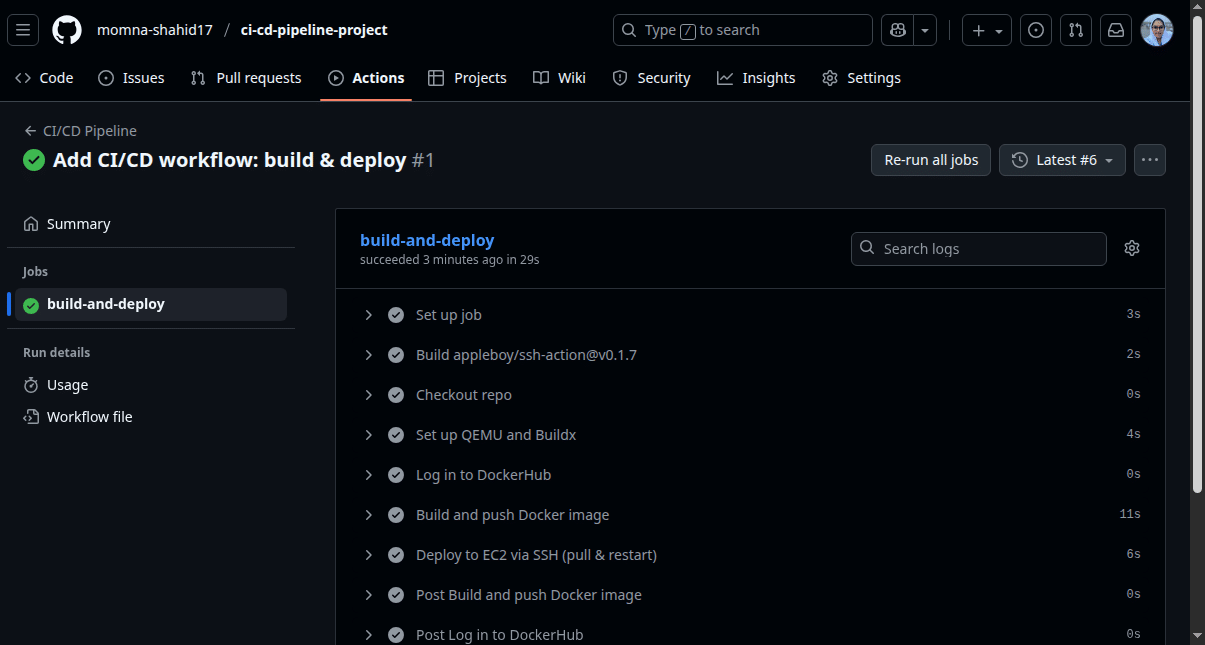 VIEW IMAGE ↗
Workflow run and successful job status.
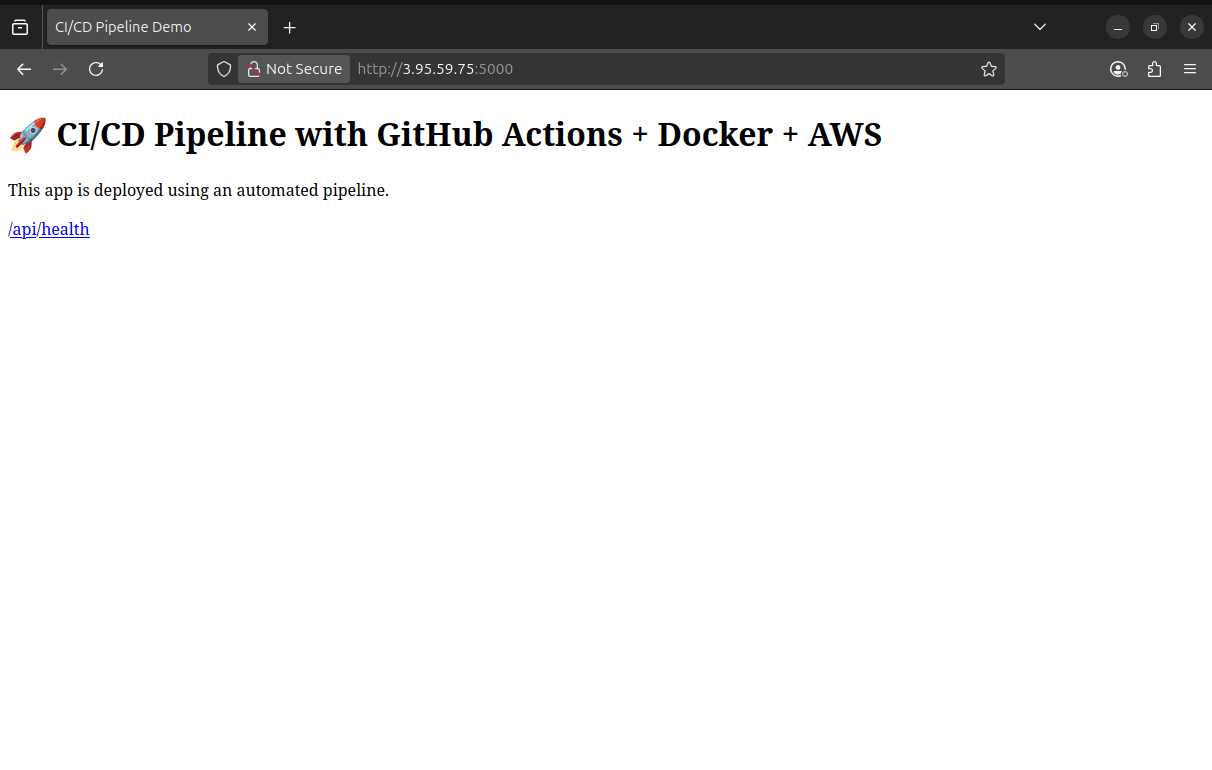 VIEW IMAGE ↗
Application access through the instance IP.
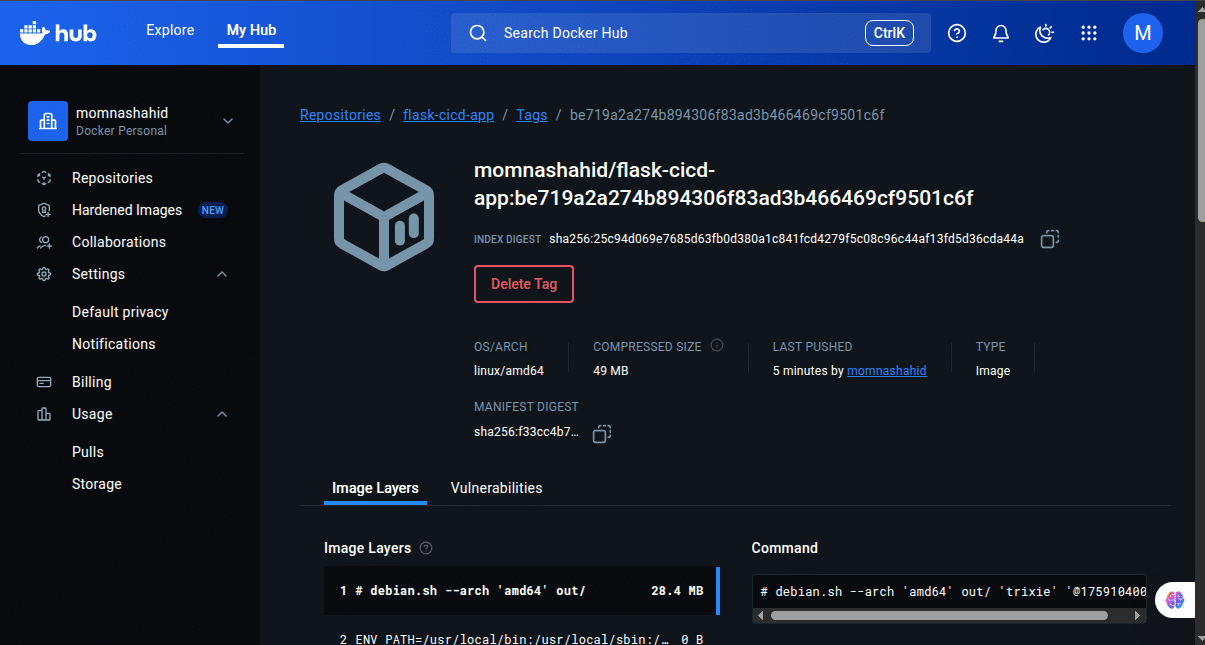 VIEW IMAGE ↗
Published container image and tag.
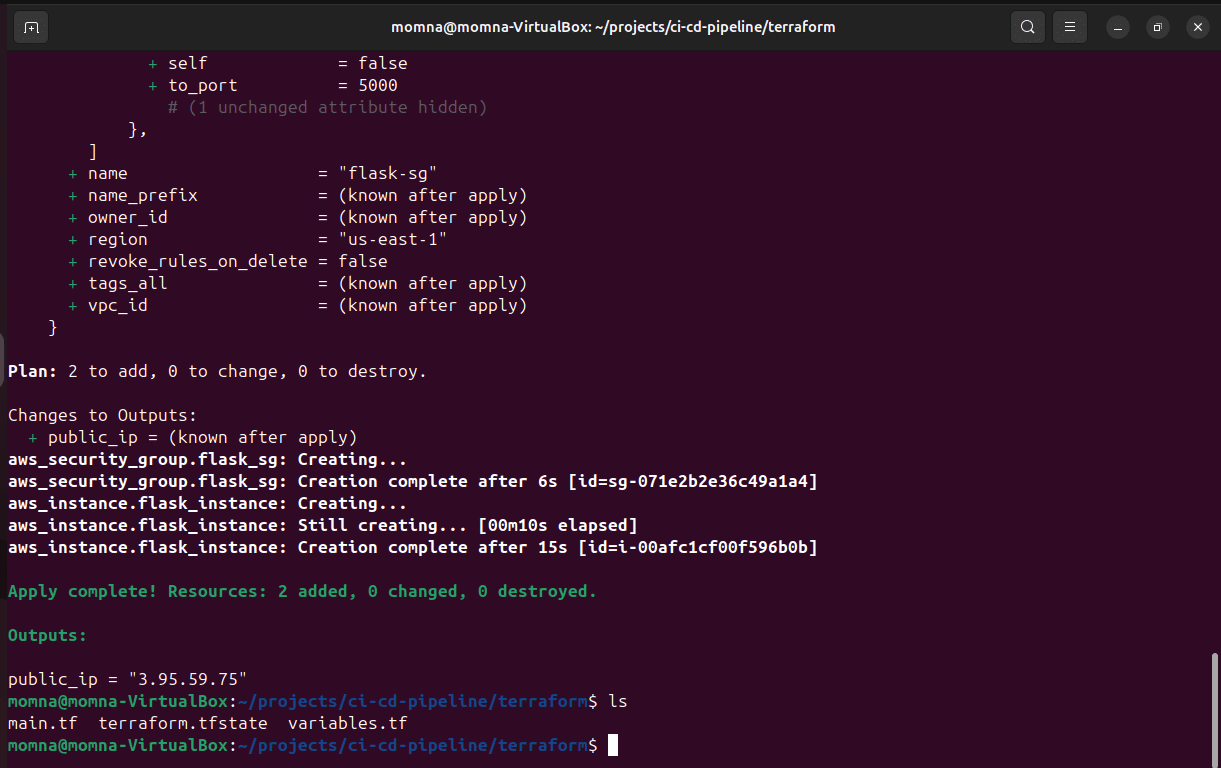 VIEW IMAGE ↗
Terraform output for the public IP address.
Select any evidence card to open its full-size screenshot in a new tab.
A CI/CD pipeline needs more than configuration files. Its key stages should be supported by observable project evidence. These artifacts document the workflow result, container image publication, infrastructure output and application access.
The GitHub Actions screenshot records a successful workflow run and completed job.
The Docker Hub artifact documents the published image tag used in the container workflow.
Terraform output and the EC2 browser screenshot document the infrastructure output and application access evidence.
Evidence-led validation Each artifact supports a specific part of the delivery story without treating a single screenshot as proof of every pipeline stage.
Automating deployment also means understanding where credentials live, how infrastructure is exposed, and how failures become visible. This section examines the security and reliability boundaries around the pipeline without assuming controls that have not been verified.
Automate repeatable operations while keeping access, configuration and deployment outcomes reviewable.
Deployment credentials must be handled separately from application source code. Repository secrets configuration is included in the project evidence; secret values should never be exposed in logs or commits.
EC2 security-group rules determine which network connections can reach the instance. Inbound access should be limited to the ports and source ranges required by the application and administration.
Workflow status makes the outcome of a run visible. A failed run should be investigated through its available job logs and error output before a new deployment attempt is treated as successful.
Infrastructure changes should be reviewed before they are applied. Terraform configuration and output provide useful context when checking the intended resources and investigating unexpected results.
These are the security and reliability considerations relevant to this stack, not a claim that every control has been implemented or independently tested. No automated rollback, monitoring system or comprehensive security audit is claimed here.
Terraform defines the AWS infrastructure separately from the application image workflow.
Repeatable workflow execution
Workflow maintenance and debugging
Portable application packaging
Image lifecycle and runtime configuration
Central image distribution
Registry access and tag management
Codified infrastructure and a cloud runtime
State, access, capacity and cost management
Automation reduces repetitive manual steps, but does not remove the need for configuration management, access control, failure investigation and infrastructure oversight.
This deployment pipeline combines workflow orchestration, container packaging, image distribution and cloud infrastructure. The value comes from how these components work together—not simply from selecting individual tools.
Application packaging and infrastructure provisioning have distinct responsibilities.
Automation standardizes steps but introduces workflow and configuration to maintain.
A cloud VM offers control, while its availability, security and upkeep remain responsibilities.
The project connects workflow automation, container distribution, infrastructure provisioning and application access. Its outcomes are evaluated through the available project evidence—not invented performance metrics.
Engineering takeaway Successful delivery is one milestone. Reliable operation also requires security, observability and recovery planning.
Screenshot records a successful workflow run and completed job.
Docker Hub screenshot documents a newly pushed image tag.
Available evidence shows a public IP output from Terraform.
Browser screenshot documents access using the instance IP.
Keep workflows and infrastructure changes version-controlled and reviewable.
Review secret handling, image tags, permissions and network exposure.
Define and test recovery procedures instead of assuming automatic rollback.
Plan application health checks, logs, monitoring and alerting.
CI/CD Pipeline with GitHub Actions, Docker, Terraform and AWS EC2.
Explore source repository ↗Selected paths from the repository. Consult GitHub for the complete file tree and current source.
The repository brings together the application, workflow configuration, infrastructure code, diagrams, screenshots and project documentation. It provides a starting point for reviewing how the delivery pipeline is assembled.
Review the GitHub Actions configuration and delivery steps.
Explore the Terraform files and their role in AWS provisioning.
Compare repository artifacts with the documented workflow and deployment results.
Add automated application and deployment health checks.
Improve operational monitoring and failure visibility.
Evaluate deployment recovery, scaling and security controls.
These are potential future improvements, not claims that the capabilities are already implemented.