

Automating application deployment is one of the most practical ways to understand how DevOps tools work together. For this project, I built a CI/CD pipeline that takes a Flask application from a GitHub repository to a running Docker container on an AWS EC2 instance.
My goal was to reduce the manual steps involved in deployment and create a repeatable workflow using GitHub Actions, Docker, Docker Hub, Terraform and AWS EC2.
Project Overview
The application is a Python Flask web application packaged inside a Docker container. GitHub Actions automates the image build and deployment whenever new code is pushed to the main branch.
- GitHub Actions: Automates the CI/CD workflow.
- Docker: Packages the Flask application and its dependencies.
- Docker Hub: Stores and distributes container images.
- AWS EC2: Hosts the deployed application.
- Terraform: Defines and provisions AWS infrastructure.
- Python and Flask: Power the application.
1. Understanding the Architecture
The workflow begins when I push code to the GitHub repository. GitHub Actions checks out the source code, builds the Docker image and pushes it to Docker Hub. It then connects to the EC2 instance over SSH, pulls the published image and starts the application container.
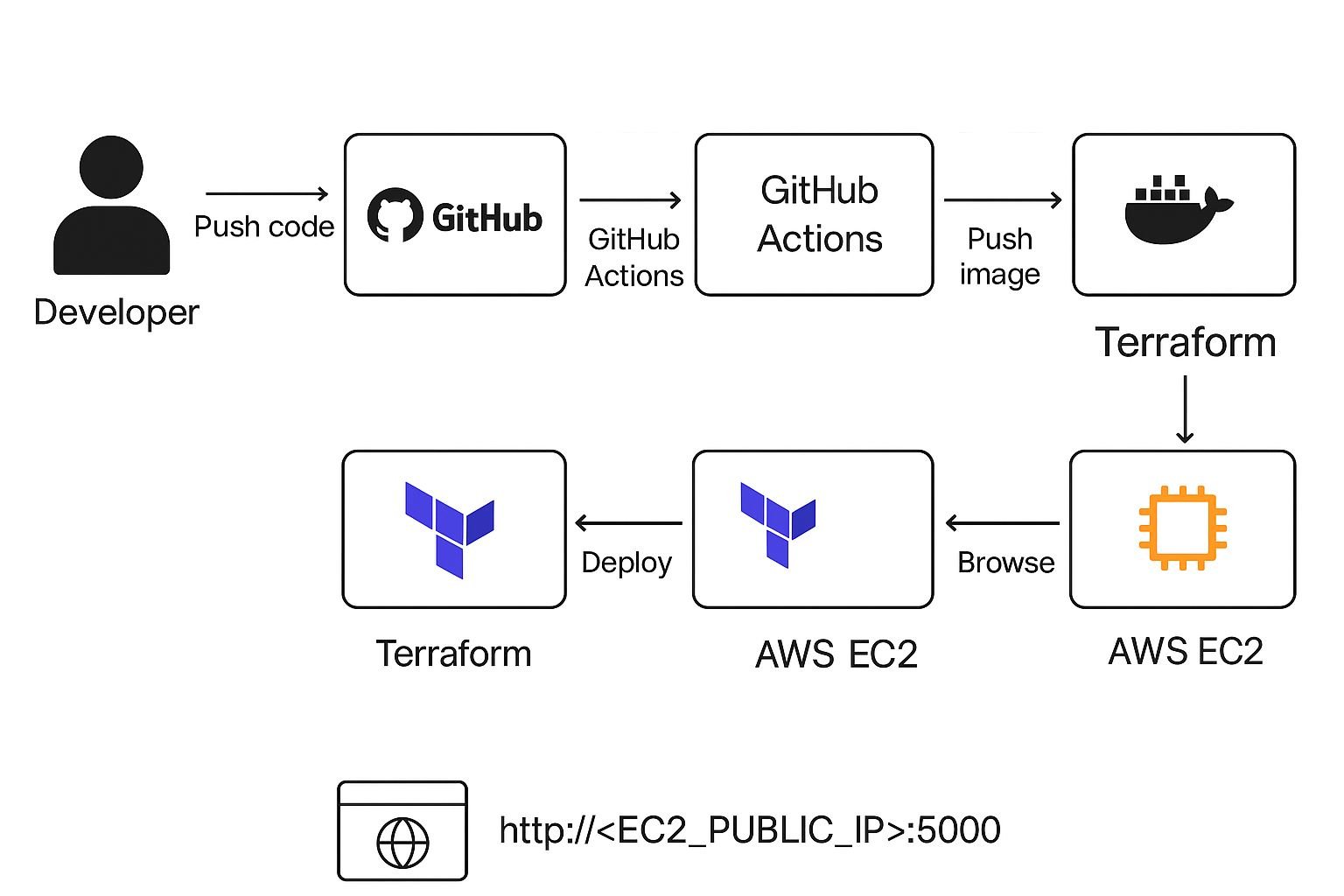
Terraform is used separately to provision the EC2 infrastructure. Keeping the application packaged as a Docker image makes deployment more consistent and avoids manually copying application files to the server.
2. Configuring the GitHub Actions Workflow
I defined the pipeline in .github/workflows/ci-cd.yml. The workflow is triggered by a push to the main branch, so changes pushed to other branches do not automatically trigger this deployment workflow.
The main stages are:
- Check out the repository.
- Set up Docker Buildx.
- Authenticate with Docker Hub.
- Build and push the Docker image.
- Connect to EC2 over SSH and deploy the new image.
This keeps the build and deployment operations in one automated workflow. The current workflow does not include a separate automated unit-test stage, which is an improvement I would make next.
3. Building the Docker Image
I used a Dockerfile based on python:3.11-slim. It sets /app as the working directory, installs dependencies from app/requirements.txt, copies the application files and exposes port 5000.
The application starts with:
CMD ["python", "app.py"]Packaging the application and its dependencies into a Docker image makes it easier to deploy the same application environment on the server. A dedicated automated testing stage would help catch application errors before the image is published.
4. Publishing Images to Docker Hub
The workflow authenticates with Docker Hub using GitHub Actions secrets and tags the image using the Git commit SHA:
${{ secrets.DOCKERHUB_USERNAME }}/flask-cicd-app:${{ github.sha }}A commit-based image tag identifies the source revision associated with a build. This is useful when investigating deployment issues or identifying a previously published version.
The image is then pushed to Docker Hub, which serves as the container registry for this project. Credentials are stored as GitHub repository secrets rather than being hard-coded into the workflow.
5. Deploying the Application to AWS EC2
After publishing the image, GitHub Actions connects to the EC2 instance using SSH. The deployment step stops and removes the existing application container if present, pulls the new image, and starts a replacement container named flask-cicd-app.
The container maps host port 5000 to container port 5000. The application can be accessed through the EC2 instance’s public IP address and port 5000, provided the application and network rules are configured correctly.
This approach is straightforward for a learning project, although replacing the existing container can cause downtime during deployment.
6. Provisioning Infrastructure with Terraform
I used Terraform to define the AWS infrastructure. The configuration selects an Ubuntu 22.04 AMI, creates an EC2 instance, configures a security group and outputs the instance’s public IP address. The default configuration uses the us-east-1 region and a t2.micro instance type.
A user-data script installs Docker and enables its service so the instance can run the published application image.
Terraform keeps infrastructure configuration in code, making it easier to review and reproduce. In this project, infrastructure provisioning is a separate step rather than part of every GitHub Actions deployment.
I also identified a security improvement: the current security group allows SSH on port 22 and application traffic on port 5000 from 0.0.0.0/0. Before using this design in production, I would restrict SSH access to trusted sources and serve application traffic through an appropriately secured HTTPS endpoint.
7. Verifying a Successful Workflow Run
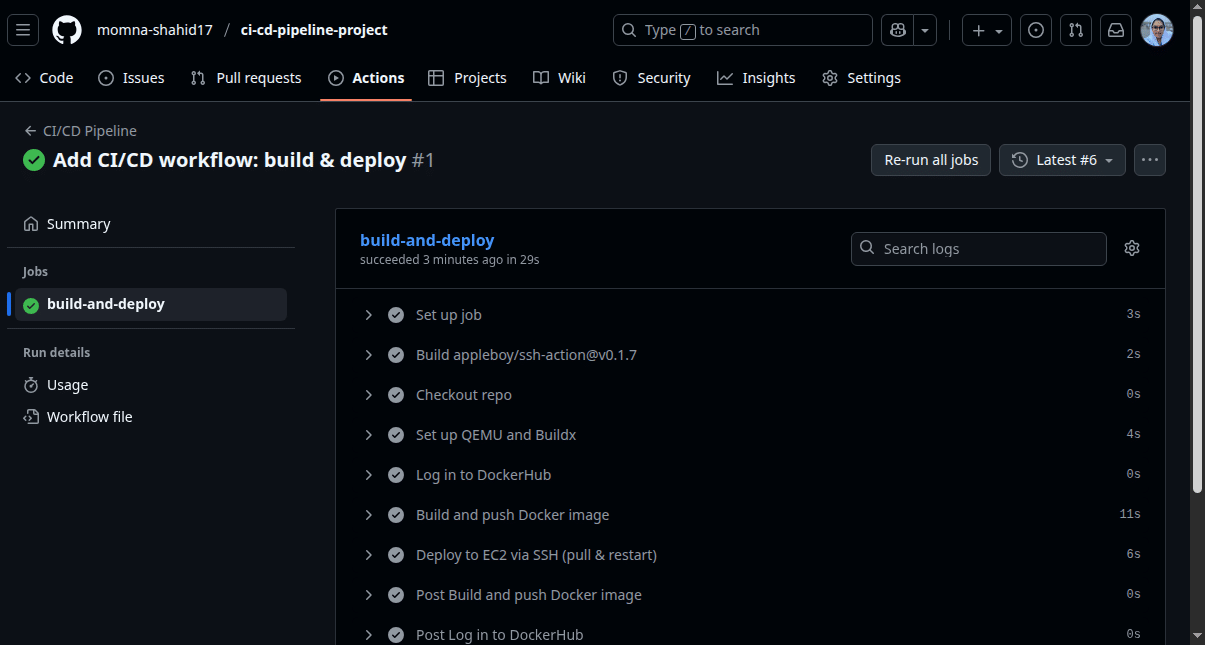
After configuring the repository secrets and deployment environment, I triggered the workflow by pushing the workflow configuration to GitHub. The repository includes a successful GitHub Actions run showing the build-and-deploy job completing.
I also verified that the Flask application opened through the EC2 instance’s public IP address. Together, these checks helped confirm that the image was published and the application was reachable after deployment.
8. Rollback Strategy and Future Improvements
A deployment pipeline should account for failures as well as successful releases. In the current implementation, the deployment script removes the existing container before pulling and starting the replacement image. It does not automatically restore the previous version if the new deployment fails.
My first improvement would be to retain the previous deployed image tag and redeploy that known-good version if a release fails. Because the images use commit-SHA tags, a previous version can be identified and deployed again.
I would also improve the pipeline by adding:
- Automated unit tests before image publishing.
- Application health checks after deployment.
- A verified rollback procedure for failed releases.
- A deployment approach that reduces downtime.
- More restrictive network access and HTTPS for production use.
These are planned improvements rather than features already implemented in the current workflow.
Key Takeaways
This project gave me practical experience connecting source control, containerization, image publishing, infrastructure provisioning and remote deployment.
The most important lessons were the value of consistent Docker images, the usefulness of commit-based image tags, and the need to plan for deployment failures. A working CI/CD pipeline is a strong starting point, but testing, health checks, secure infrastructure and reliable rollback procedures are essential considerations as a project moves toward production.
The complete project is available on GitHub:
View the CI/CD Pipeline Project on GitHub →
Technologies: GitHub Actions · Docker · Docker Hub · Terraform · AWS EC2 · Python · Flask