

Data pipelines are a common part of modern engineering systems. Applications often depend on information coming from external APIs, databases and other services, but collecting that information is only the beginning. The data also needs to be transformed, stored and processed on a predictable schedule.
For this project, I built an ETL workflow using Apache Airflow and PostgreSQL. The pipeline retrieves astronomy data from NASA’s Astronomy Picture of the Day (APOD) API, selects the fields required by the application and stores the resulting records in a PostgreSQL database.
My focus was to understand how Airflow can coordinate API requests and database operations through a DAG, while keeping the development environment manageable with Docker and Astro Runtime.
1. Understanding the ETL Workflow
ETL stands for Extract, Transform and Load. Each stage has a specific responsibility: extract data from a source, transform it into a useful structure, and load it into a destination where it can be queried or used by other applications.
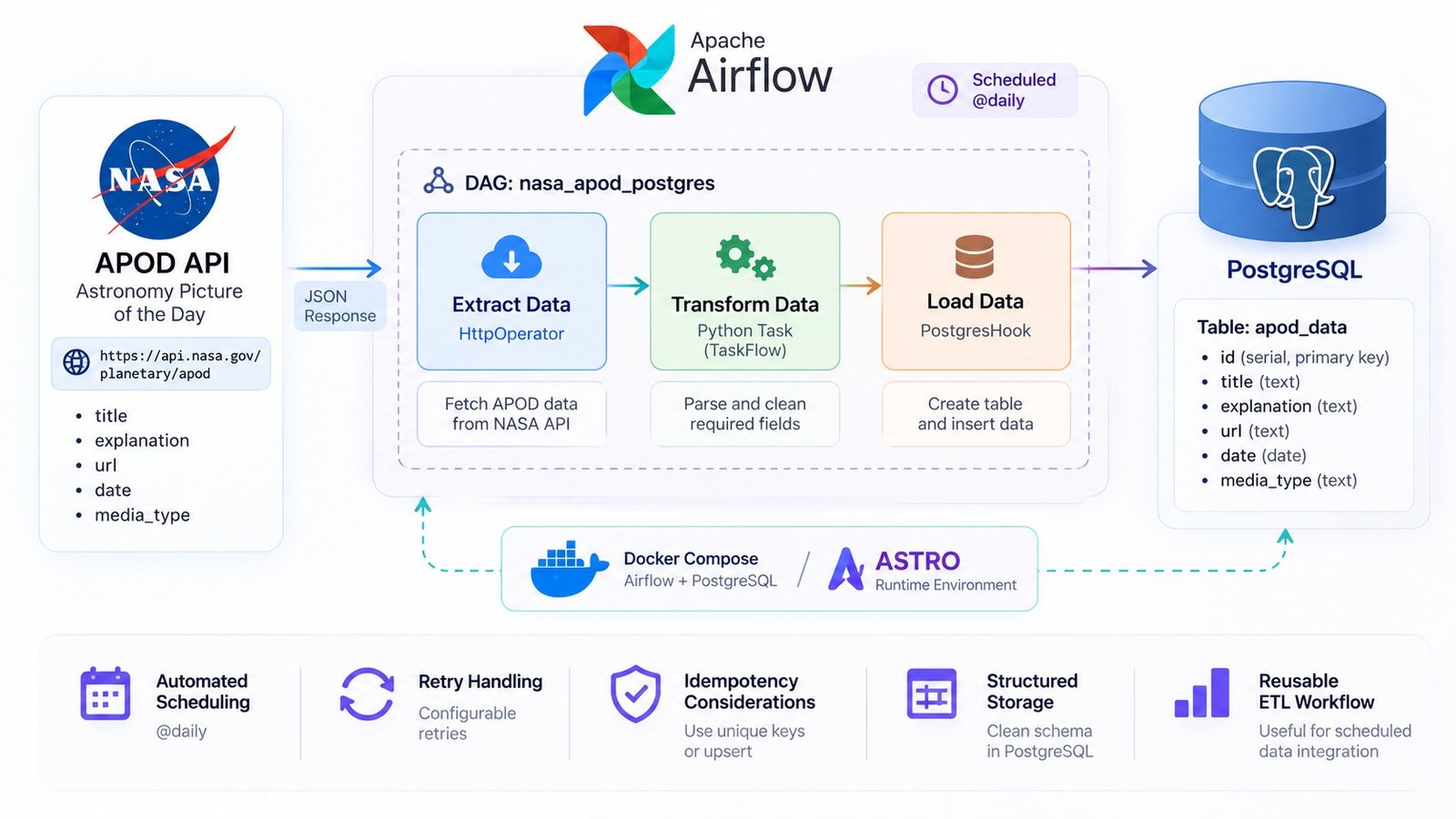
In this implementation, NASA’s APOD API is the source and PostgreSQL is the destination. Apache Airflow coordinates the tasks and controls their execution order.
The workflow begins with a request to the NASA APOD endpoint. The API returns a JSON response containing information about the astronomy picture of the day.
Airflow passes that response to a Python transformation task. The task selects the fields required by the project, and the resulting structured record is passed to the PostgreSQL loading task.
A separate task creates the destination table if it does not already exist. This keeps the database preparation step inside the workflow rather than requiring a manually created table before every run.
2. Extracting Data from the NASA APOD API
I selected NASA’s Astronomy Picture of the Day API as the external data source. It provides astronomy-related information in JSON format, including the title, explanation, media URL, date and media type.
The API endpoint used by the project is:
https://api.nasa.gov/planetary/apodInstead of writing a standalone HTTP request inside a Python function, I used Airflow’s HttpOperator. This makes the API request a defined Airflow task with its own execution status and output.
The relevant part of the DAG is:
extract_apod = HttpOperator(
    task_id='extract_apod',
    http_conn_id='nasa_api',
    endpoint='planetary/apod',
    method='GET',
    data={
        "api_key": "{{ conn.nasa_api.extra_dejson.api_key }}"
    },
    response_filter=lambda response: response.json(),
)
The http_conn_id references an Airflow connection named nasa_api. The API key is read from the connection’s extra configuration rather than being supplied as a normal parameter in the task definition.
The response filter converts the HTTP response into JSON. This structured response is then made available to the downstream transformation task through Airflow’s task output mechanism.
Using an Airflow connection keeps the API configuration separate from the DAG’s main logic. It also makes it easier to change connection details without rewriting the task itself.
3. Transforming the API Response with TaskFlow
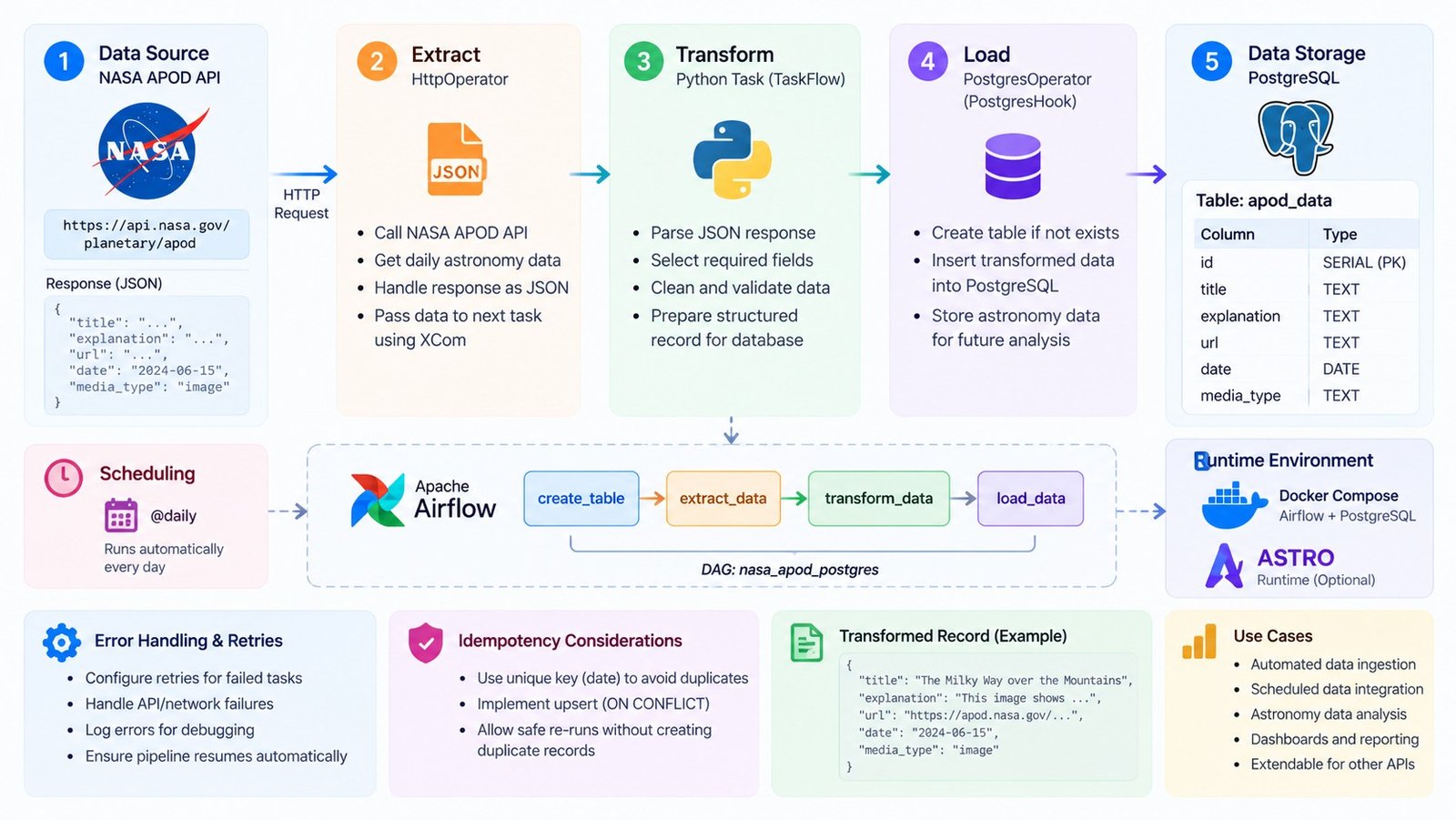
The API response contains more information than the database needs for this project. I used Airflow’s TaskFlow API to define a Python task that selects the relevant fields and prepares a smaller dictionary for the loading stage.
The transformation function extracts:
title— the title of the astronomy entry.explanation— the description provided by NASA.url— the media URL.date— the APOD publication date.media_type— the type of media returned by the API.
The current implementation uses response.get() with empty-string defaults. This avoids a missing dictionary key causing an immediate lookup error, although production data validation should also check that required values are present and valid.
The transformation task is defined as:
@task
def transform_apod_data(response):
    apod_data = {
        'title': response.get('title', ''),
        'explanation': response.get('explanation', ''),
        'url': response.get('url', ''),
        'date': response.get('date', ''),
        'media_type': response.get('media_type', '')
    }

    return apod_data
Airflow’s TaskFlow interface allows the returned dictionary to be passed to the next task. Airflow manages this task-to-task data handoff through its XCom mechanism, so I do not need to manually write an intermediate file just to pass this small record between tasks.
4. Designing the PostgreSQL Schema
PostgreSQL is the destination database for the extracted and transformed APOD records. Before inserting data, the pipeline creates the target table if it does not already exist.
I used Airflow’s PostgresHook to connect to PostgreSQL through an Airflow connection named my_postgres_connection.
The table creation query is:
CREATE TABLE IF NOT EXISTS apod_data (
    id SERIAL PRIMARY KEY,
    title VARCHAR(255),
    explanation TEXT,
    url TEXT,
    date DATE,
    media_type VARCHAR(50)
);
The schema keeps the data types aligned with the information being stored:
- id: A serial primary key that identifies each inserted row.
- title: A bounded text field for the APOD title.
- explanation: A text field for the longer description.
- url: A text field for the media URL.
- date: A PostgreSQL date field for the APOD date.
- media_type: A bounded text field for the media type.
The CREATE TABLE IF NOT EXISTS statement makes table initialization safe to repeat: if the table is already present, the statement does not attempt to create it again.
5. Loading the Transformed Record
Once the transformation task returns the selected fields, the loading task inserts them into PostgreSQL.
The project uses parameterized SQL rather than building an SQL string by directly joining values from the API response. This keeps the query structure separate from the supplied data values.
insert_query = """
INSERT INTO apod_data
(title, explanation, url, date, media_type)
VALUES (%s, %s, %s, %s, %s);
"""

postgres_hook.run(
    insert_query,
    parameters=(
        apod_data['title'],
        apod_data['explanation'],
        apod_data['url'],
        apod_data['date'],
        apod_data['media_type']
    )
)
The loading task uses the same PostgreSQL Airflow connection as the table creation task. This keeps database connection details outside the SQL and Python task logic.
One design detail worth noting is that the current table uses an auto-incrementing ID as its primary key. The APOD date is stored as a regular date column, but it is not currently defined as unique.
6. Defining the DAG and Scheduling
Airflow represents the workflow as a Directed Acyclic Graph, or DAG. The DAG defines the tasks, their dependencies and the schedule on which Airflow should run them.
The project defines the DAG with the ID nasa_apod_postgres:
with DAG(
    dag_id='nasa_apod_postgres',
    start_date=datetime(2026, 6, 22),
    schedule='@daily',
    catchup=False
) as dag:
The @daily schedule tells Airflow to create a daily schedule for the workflow. The catchup=False setting prevents Airflow from automatically creating runs for every missed schedule interval between the start date and the current date when the DAG becomes active.
The task dependencies are defined at the end of the DAG:
create_table() >> extract_apod

api_response = extract_apod.output

transformed_data = transform_apod_data(api_response)

load_data_to_postgres(transformed_data)
This establishes the intended execution order:
- Create the PostgreSQL table if it does not exist.
- Extract the APOD response from NASA.
- Transform the response into the selected data structure.
- Load the transformed record into PostgreSQL.
The dependency operators make the execution order explicit. Airflow can use this graph to schedule tasks and manage their states independently.
7. Running Airflow and PostgreSQL with Docker
For local development, I used the Astro Runtime Docker image and a Docker Compose configuration for PostgreSQL. This gives the project a containerized environment for running the Airflow development setup alongside its database service.
The Dockerfile is intentionally small:
FROM astrocrpublic.azurecr.io/runtime:3.2-5The project requirements include the HTTP and PostgreSQL Airflow providers:
apache-airflow-providers-http
apache-airflow-providers-postgres
The Docker Compose file defines PostgreSQL 13, exposes port 5432, and mounts a named volume at /var/lib/postgresql/data. The volume allows the database files to persist across container restarts.
The README describes starting the local Airflow environment with:
astro dev startBefore triggering the DAG, the required Airflow connections need to be configured:
nasa_api— the HTTP connection used by the NASA API task, with the API key stored in its extra configuration.my_postgres_connection— the PostgreSQL connection used by the table creation and loading tasks.
The PostgreSQL credentials shown in the Compose file are development defaults. They should be replaced with securely managed credentials before using a similar configuration outside a local development environment.
8. Retries, Idempotency and Failure Handling
A scheduled data pipeline needs to account for more than its normal successful execution path. External APIs can become unavailable, network requests can fail, and database operations can be interrupted.
In the current DAG, I have not configured a retry policy through default_args or task-level retry settings. Airflow’s retry mechanism can be added by defining settings such as:
default_args = {
    "retries": 2,
    "retry_delay": timedelta(minutes=5)
}
This is an example of a recommended improvement, not a setting currently present in the supplied DAG. A retry policy should be chosen according to the failure type and the behaviour of the external API.
Idempotency is another important consideration. The current loading task performs a standard SQL INSERT. Since the APOD date is not unique in the schema, running the same logical data load again can insert a duplicate row.
For a daily API ingestion pipeline, I would consider making the APOD date unique and using an upsert. For example, the database could enforce a unique constraint on date, followed by an insert statement using ON CONFLICT to update an existing record.
-- Recommended database improvement

ALTER TABLE apod_data
ADD CONSTRAINT apod_data_date_unique
UNIQUE (date);

-- Example upsert pattern

INSERT INTO apod_data
(title, explanation, url, date, media_type)
VALUES (%s, %s, %s, %s, %s)
ON CONFLICT (date)
DO UPDATE SET
    title = EXCLUDED.title,
    explanation = EXCLUDED.explanation,
    url = EXCLUDED.url,
    media_type = EXCLUDED.media_type;
This approach would make repeated loads for the same APOD date update the existing record rather than create another row. It is a useful next step for making the pipeline safer to retry and rerun.
9. Testing and Improving the Workflow
The repository includes an example pytest file that uses Airflow’s DagBag to check for DAG import errors, tags and retry settings.
There is an important gap between that example test and the current DAG configuration: the test expects DAG tags and at least two retries, but the supplied DAG does not define tags or retry settings. Those expectations need to be aligned before treating the test as a passing validation of this DAG.
For a stronger implementation, I would extend the tests to cover the actual pipeline behaviour:
- Validate that the DAG can be imported without errors.
- Check that the expected task IDs and dependencies exist.
- Test the transformation function with a representative NASA API response.
- Test missing or unexpected API fields.
- Verify database insertion and duplicate handling.
- Test retry behaviour after configuring a retry policy.
I would also add structured logging and data-quality checks so that unexpected API responses can be identified before they reach the database.
10. What I Learned
Building this workflow helped me understand how Airflow connects independent operations into a scheduled data pipeline. The API extraction, Python transformation and PostgreSQL loading stages each have their own responsibility, while the DAG defines how they work together.
I also gained practical experience with Airflow operators, the TaskFlow API, XCom-based task communication, database hooks, Airflow connections and containerized development using Astro Runtime and Docker.
Most importantly, the project made the reliability side of ETL engineering clearer to me. Scheduling a pipeline is only one part of the problem. Retry policies, idempotent database operations, validation and observability are equally important when a workflow is expected to run repeatedly.
Conclusion
This project demonstrates a practical API-to-database workflow using Apache Airflow and PostgreSQL. By extracting NASA APOD data, transforming selected fields and loading them into a structured table, I was able to organize the ingestion process as a reusable DAG.
There is room to strengthen the current implementation with explicit retries, duplicate-safe loading, data validation and more comprehensive tests. Those improvements would make the pipeline more resilient and suitable for a wider range of scheduled integration workloads.
For me, this was a useful step in understanding how workflow orchestration fits into data engineering: not just moving data from one place to another, but making each stage understandable, manageable and reliable.
Project Repository
The complete source code, DAG definition and local development configuration are available on GitHub:
View the Airflow ETL Pipeline Project on GitHub →
Technologies: Apache Airflow · PostgreSQL · NASA APOD API · Python · Docker · Astro Runtime · HttpOperator · TaskFlow API · PostgresHook